Friday, August 22, 2008
Download Junkie
When do you know that you are a download junkie? This week I was digi shopping for a few new items to spruce up my collection. I found a great kit and went to purchase it. I am not a big user of paypal, but from the look of it, it was my only option to pay. So, I paid and then went to download my kit. DO NOT PASS GO! My account was pending receipt of the echeck from paypal. I have to wait for that to get there!? For the past three days I have been checking the site hoping and wishing that today is the day I can download my stuff. Then it hit me. I am a download junkie. There is nothing like instant gratification when you buy a download. No lines or poor customer service when you shop. You can get it NOW! I love that feeling. It seriously made me mad when I couldn't have it. If I had been 3 years old I probably would have thrown a tantrum. BUYERS BEWARE: If you pay with paypal, the same thing could happen to you. And then, you would know that you are a DOWNLOAD JUNKIE!!! Join the club.

Saturday, July 26, 2008
Digital Crop - San Jose
 Right this very minute, I am attending a digital laptop crop at the headquarters of Adobe who makes Photoshop. My friends Jenny, Alison, Cathy, and Ann are here with me. We are having fun learning photoshop techniques, creating our own pages, and eating lots of goodies. The above layout I made using extraction techniques which is one of my favorite things to do. It has been a lot of fun and exciting to be here at Adobe!
Friday, July 11, 2008
Glitter

Who doesn't like a little bling-bling in their life?! I thought that I would share with you a way to make your elements or text sparkle. This glitter effect is really easy. I couldn't believe how simple it was. As you can see from above, you can even use it on your brushes. After you have created your element, just do the following:
1. Select your element's layer.
2. Choose Filter > Noise > Add Noise.
3. At this point you get to choose how much noise you want or how harsh of a glitter effect do you want to have. Use the slide and view window to see where you want the value to be. 50% is a good start. Some colors will look better than others too.
4. Select OK.
Now you have a glitter element. To get the look above, I duplicated my text three times and added noise to all the layers. Then I added bevels and shadows. Good Luck!
Monday, June 16, 2008
Where Is The Digi Chick?
Well, I realize that I haven't posted for two months now. I am not ignoring the world of digital scrapbooking, just checking out another venue. I have been creating digital elements as well. I am planning on putting out another kit within the next two weeks. You would think that having the kids out of school would give me more time. Yeah, right! In the meantime, check out this layout that I scraplifted from a paper magazine for my husband for Father's Day. The kids all helped pick out photos. It is intended to be hung in his office at work to make him smile on those not-so-great days!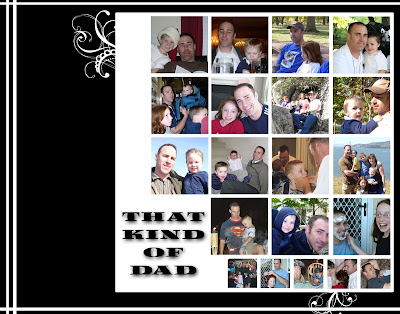
The kids will each add some text of their choice along the left side. It was alot of fun to put together!
The kids will each add some text of their choice along the left side. It was alot of fun to put together!
Tuesday, April 15, 2008
My First Paper Kit!
Ta-Da! Here it is! My first package of digital backgrounds. I have been teaching myself how to create my own stuff for another project and thought why not create things I can use and share with all my friends.
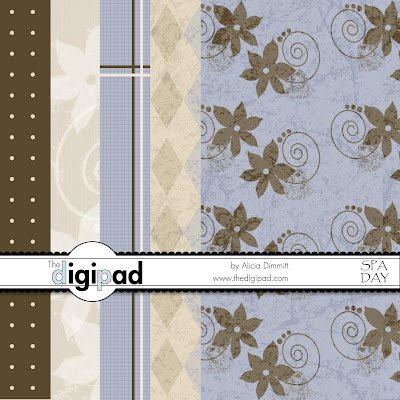
I love blues and browns. They are very soothing colors for me and make me think of spending the day at the spa. I wish I could go more often. If you would like to download this kit, click here. If you create a page with my stuff, send me a link to your gallery or email it to me so I can check it out! Enjoy!

I love blues and browns. They are very soothing colors for me and make me think of spending the day at the spa. I wish I could go more often. If you would like to download this kit, click here. If you create a page with my stuff, send me a link to your gallery or email it to me so I can check it out! Enjoy!
Saturday, April 12, 2008
Designing My Own Stuff!
Recently, I have been pushing myself a little more to learn techniques that will allow me to design some of my own stuff. My mind is constantly in this design mode and my kids see me writing down notes on little pieces of paper as the inspiration comes. It has been fun to see what I can actually come up with. Some stuff ends up in the trash, other stuff gets redone until I am happy with it. All of this made me think about the creative process. Odds are if you are into digitial scrapbooking you have some sort of creative bone in your body. The process of creating something speaks to your inner you. It is satisfying to create something. It is part of you coming out and becomes something personal. I love looking at other people's layouts and seeing their personality come out through color and style. I hope that by next week I will have a few backgrounds designed that I can share with you. Be kind. They aren't over the top, just simple like me. Then maybe you can do a layout with them and share it with me! I would love to see it!
Thursday, April 3, 2008
Just The Right Brush!

Brushes have to be one of the coolest tools out there to scrapbook with digitally. Whenever I feel there is something missing on my page I look to brushes to fill the void. They can be used to accent something or add dimension without overpowering your layout. Even better, when you can't find the brush you are looking for, you can make one yourself! I did just that when designing my header for this page. I wanted some really cool items between my catchy words. I couldn't find exactly what I wanted. So, I took some pictures and made them in to brushes. The best part of brushes is the experimenting with them anyway you feel like and then being able to undo them if it doesn't turn out. Not like real stamps that make you start all over after making a mistake. This is one of my favorite LO using brushes. I used swirls and grunge brushes to reach this effect. You might think that swirls and grunge wouldn't go well together but opposites attract and I think provide great contrast!
Subscribe to:
Posts (Atom)

