Friday, July 11, 2008

Glitter


Who doesn't like a little bling-bling in their life?! I thought that I would share with you a way to make your elements or text sparkle. This glitter effect is really easy. I couldn't believe how simple it was. As you can see from above, you can even use it on your brushes. After you have created your element, just do the following:
1. Select your element's layer.
2. Choose Filter > Noise > Add Noise.
3. At this point you get to choose how much noise you want or how harsh of a glitter effect do you want to have. Use the slide and view window to see where you want the value to be. 50% is a good start. Some colors will look better than others too.
4. Select OK.
Now you have a glitter element. To get the look above, I duplicated my text three times and added noise to all the layers. Then I added bevels and shadows. Good Luck!

Monday, June 16, 2008

Where Is The Digi Chick?

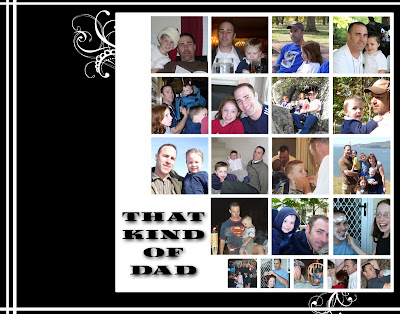
Well, I realize that I haven't posted for two months now. I am not ignoring the world of digital scrapbooking, just checking out another venue. I have been creating digital elements as well. I am planning on putting out another kit within the next two weeks. You would think that having the kids out of school would give me more time. Yeah, right! In the meantime, check out this layout that I scraplifted from a paper magazine for my husband for Father's Day. The kids all helped pick out photos. It is intended to be hung in his office at work to make him smile on those not-so-great days!
The kids will each add some text of their choice along the left side. It was alot of fun to put together!

Tuesday, April 15, 2008

My First Paper Kit!

Ta-Da! Here it is! My first package of digital backgrounds. I have been teaching myself how to create my own stuff for another project and thought why not create things I can use and share with all my friends.

I love blues and browns. They are very soothing colors for me and make me think of spending the day at the spa. I wish I could go more often. If you would like to download this kit, click here. If you create a page with my stuff, send me a link to your gallery or email it to me so I can check it out! Enjoy!

Saturday, April 12, 2008

Designing My Own Stuff!

Recently, I have been pushing myself a little more to learn techniques that will allow me to design some of my own stuff. My mind is constantly in this design mode and my kids see me writing down notes on little pieces of paper as the inspiration comes. It has been fun to see what I can actually come up with. Some stuff ends up in the trash, other stuff gets redone until I am happy with it. All of this made me think about the creative process. Odds are if you are into digitial scrapbooking you have some sort of creative bone in your body. The process of creating something speaks to your inner you. It is satisfying to create something. It is part of you coming out and becomes something personal. I love looking at other people's layouts and seeing their personality come out through color and style. I hope that by next week I will have a few backgrounds designed that I can share with you. Be kind. They aren't over the top, just simple like me. Then maybe you can do a layout with them and share it with me! I would love to see it!

Thursday, April 3, 2008

Just The Right Brush!


Brushes have to be one of the coolest tools out there to scrapbook with digitally. Whenever I feel there is something missing on my page I look to brushes to fill the void. They can be used to accent something or add dimension without overpowering your layout. Even better, when you can't find the brush you are looking for, you can make one yourself! I did just that when designing my header for this page. I wanted some really cool items between my catchy words. I couldn't find exactly what I wanted. So, I took some pictures and made them in to brushes. The best part of brushes is the experimenting with them anyway you feel like and then being able to undo them if it doesn't turn out. Not like real stamps that make you start all over after making a mistake. This is one of my favorite LO using brushes. I used swirls and grunge brushes to reach this effect. You might think that swirls and grunge wouldn't go well together but opposites attract and I think provide great contrast!

Saturday, March 29, 2008

Baby Book Completed!

I finished my last son's baby book this past week and sent it to Shutterfly to be printed. I thought I would put together a slide show to give you a peek of the book. Most of you will never see it anyway, so I hope you enjoy!

Thursday, March 20, 2008

Journaling

When I first started scrapbooking, I loved doing all the artsy stuff. The papers, the embellishments, and the photos were so captivating. I would always finish the page up to the point where I should have added a title and journaling. I had these beautiful books but nothing to let my children know what was the history behind it. Now that I have converted to digital scrapbooking, you would think that journaling would be so much easier and done quickly. I have to confess that I still revert back to my old ways, but I am improving. Journaling is fun to play with and being able to add several fonts in several sizes adds to the creative process. It can go up and down, in a circle, in a heart shape, whatever you can imagine. The boundaries are almost limitless. This is one of my favorite examples of journaling:

First, I love the geometric and monochromatic theme of this two page layout. I picked red to add a little pop to my layout and used it to highlight a few of the words on the first page which listed the things we do traditionally at Christmas. For the rest of my journaling I fit it into a box to continue with the monochromatic theme. I just love how it turned out and the journaling will document those things we do together as a family to celebrate the holidays!